

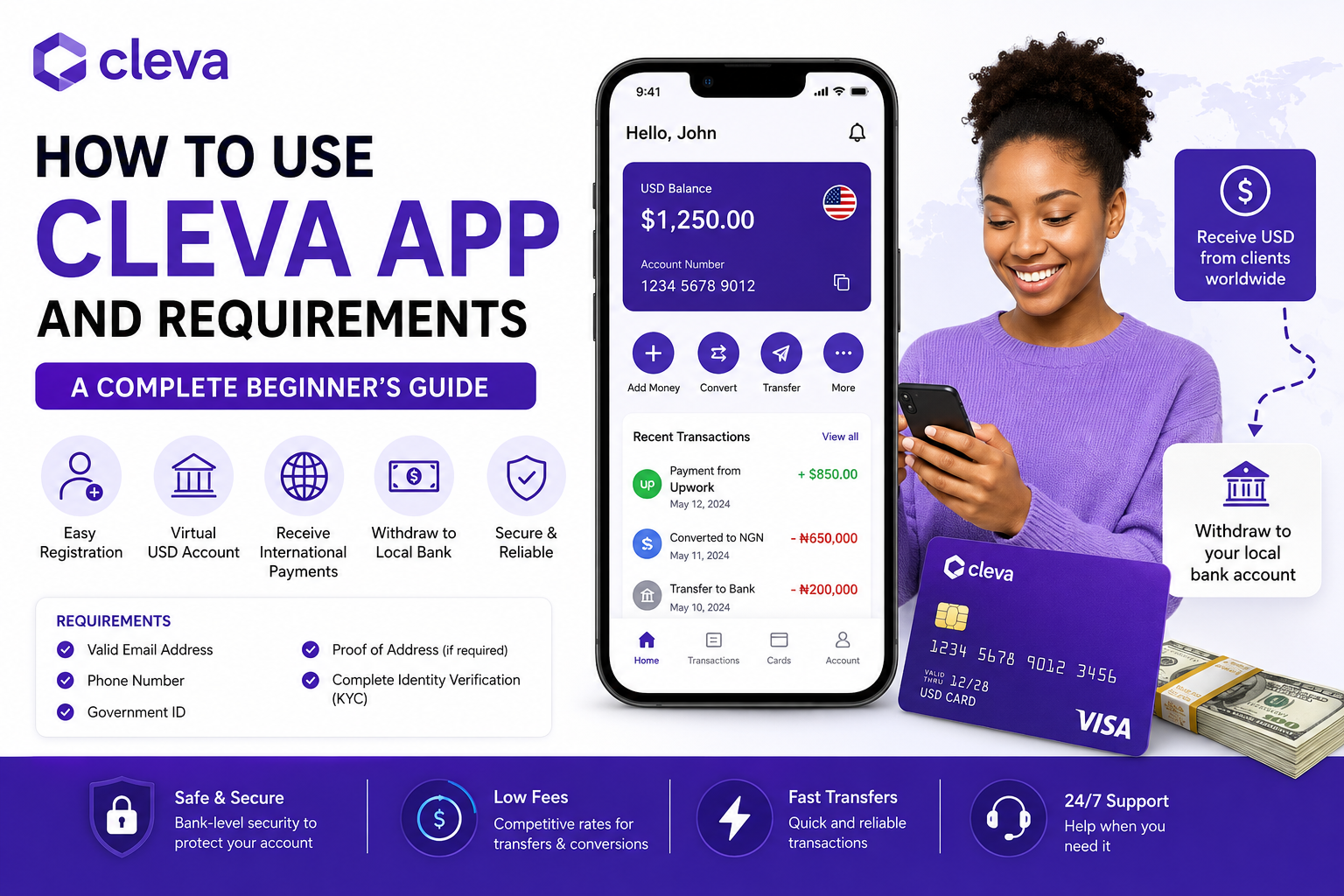
How to Use the Cleva App and Requirements (Complete Beginner’s Guide)
Receiving payments in US dollars can be challenging for many freelancers, remote workers, and online business owners, especially in countries where international payment options are limited. Cleva is a fintech platform designed to simplify this process by providing eligible users with access to virtual foreign currency accounts and other financial services.
If you’re wondering how to use the Cleva app, what documents you need to register, and whether it’s available in Nigeria, this guide walks you through everything you need to know before opening an account.
What Is the Cleva App?
Cleva is a financial technology (fintech) platform that helps users receive international payments through virtual foreign currency accounts. It is particularly popular among freelancers, remote employees, digital entrepreneurs, and online service providers who work with international clients.
Depending on your region and account type, Cleva may offer services such as:
- Virtual USD accounts
- International money transfers
- Currency conversion
- Virtual payment cards (where available)
- Mobile and web account management
Because Cleva is a fintech service rather than a traditional bank, the exact features available may vary depending on your country and regulatory requirements.
Is Cleva Legit?
Yes. Cleva is a legitimate fintech platform that provides financial services through regulated banking and payment partners.
However, it’s important to understand that:
- Cleva is not a traditional commercial bank.
- Some services depend on third-party financial partners.
- Features and availability can change as the platform expands.
Always download the app from the official app stores or access it through Cleva’s official website to avoid phishing or fake applications.
Key Features of the Cleva App
Cleva offers several features designed for users who receive payments from abroad.
Virtual USD Account
Eligible users can receive a virtual US dollar account for accepting international payments from supported sources.
Currency Conversion
Users can convert supported foreign currencies into their local currency at the exchange rates provided within the platform.
Easy Transfers
The app allows users to manage incoming funds and initiate transfers, subject to available services and verification requirements.
Secure Account Management
Users can monitor transactions, balances, and account activity through the mobile app or web dashboard.
User-Friendly Interface
The app is designed with a clean interface that makes it easy for beginners to navigate.
READ ALSO: How to Redeem an Amazon Gift Card to a Bank Account (Safe & Legal Guide)
Requirements to Open a Cleva Account
Before registering, make sure you meet the platform’s eligibility requirements.
Typical requirements include:
- A valid email address
- A mobile phone number
- A government-issued identification document
- Personal information such as your full name and date of birth
- A compatible smartphone or internet-enabled device
- Completion of identity verification (KYC)
Additional documents may be requested depending on your country of residence and applicable regulations.
READ ALSO: Opinion Outpost Review (2026): Is It Legit? Complete Guide for Nigerians
Countries Supported
Cleva’s services are not available worldwide.
Availability depends on:
- Your country of residence
- Local financial regulations
- Partner banking services
- Compliance requirements
Before registering, check Cleva’s official website or support documentation to confirm whether your country is currently supported.
Can Nigerians Use Cleva?
Yes. Cleva is widely used by many eligible users in Nigeria, particularly freelancers, software developers, remote workers, content creators, and online entrepreneurs who receive payments from international clients.
However:
- Some features may have eligibility requirements.
- Verification is required before accessing certain services.
- Available payment methods and supported currencies may change over time.
Always review the latest eligibility information on Cleva’s official channels.
How to Register on the Cleva App
Creating a Cleva account is straightforward.
Step 1: Download the App
Install the Cleva app from the official Google Play Store or Apple App Store, or visit the official website if web registration is available.
Step 2: Create an Account
Sign up using:
- Your email address
- A secure password
Verify your email if prompted.
Step 3: Complete Your Profile
Provide your:
- Full legal name
- Phone number
- Date of birth
- Residential address
Ensure that the information matches your identification documents.
How to Verify Your Account (KYC)
To comply with financial regulations, Cleva requires identity verification before certain services become available.
You may be asked to provide:
- A National ID card
- International Passport
- Driver’s License
- Bank Verification Number (where applicable)
- Selfie verification
- Proof of address (if requested)
Verification times can vary depending on application volume and document quality.
How to Fund Your Cleva Account
Funding options depend on your region and the services available for your account.
Common methods may include:
- Receiving international payments into your virtual account
- Bank transfers from supported accounts
- Currency conversion from supported balances
Follow the instructions within the app to view the funding methods available to your account.
How to Receive USD Payments with Cleva
One of Cleva’s most popular features is its ability to help eligible users receive payments in US dollars.
A typical process looks like this:
- Complete account verification.
- Obtain your virtual USD account details (if available).
- Share those details with your employer or client.
- Receive payment into your virtual account.
- Convert funds or withdraw them according to the services available in your region.
Always ensure the sender uses the correct payment details to avoid delays.
Security Tips for Cleva Users
Protect your account by following these best practices:
- Enable two-factor authentication if available.
- Use a strong, unique password.
- Never share your login credentials.
- Download the app only from official sources.
- Monitor your transaction history regularly.
- Be cautious of phishing emails and fake customer support accounts.
Keeping your account secure helps reduce the risk of unauthorized access and financial loss.
Receiving payments in US dollars can be challenging for many freelancers, remote workers, and online business owners, especially in countries where international payment options are limited. Cleva is a fintech platform designed to simplify this process by providing eligible users with access to virtual foreign currency accounts and other financial services.
If you’re wondering how to use the Cleva app, what documents you need to register, and whether it’s available in Nigeria, this guide walks you through everything you need to know before opening an account.
READ ALSO: How to Redeem an Amazon Gift Card to a Bank Account (Safe & Legal Guide)
What Is the Cleva App?
Cleva is a financial technology (fintech) platform that helps users receive international payments through virtual foreign currency accounts. It is particularly popular among freelancers, remote employees, digital entrepreneurs, and online service providers who work with international clients.
Depending on your region and account type, Cleva may offer services such as:
- Virtual USD accounts
- International money transfers
- Currency conversion
- Virtual payment cards (where available)
- Mobile and web account management
Because Cleva is a fintech service rather than a traditional bank, the exact features available may vary depending on your country and regulatory requirements.
Is Cleva Legit?
Yes. Cleva is a legitimate fintech platform that provides financial services through regulated banking and payment partners.
However, it’s important to understand that:
- Cleva is not a traditional commercial bank.
- Some services depend on third-party financial partners.
- Features and availability can change as the platform expands.
Always download the app from the official app stores or access it through Cleva’s official website to avoid phishing or fake applications.
Key Features of the Cleva App
Cleva offers several features designed for users who receive payments from abroad.
Virtual USD Account
Eligible users can receive a virtual US dollar account for accepting international payments from supported sources.
Currency Conversion
Users can convert supported foreign currencies into their local currency at the exchange rates provided within the platform.
Easy Transfers
The app allows users to manage incoming funds and initiate transfers, subject to available services and verification requirements.
Secure Account Management
Users can monitor transactions, balances, and account activity through the mobile app or web dashboard.
User-Friendly Interface
The app is designed with a clean interface that makes it easy for beginners to navigate.
Requirements to Open a Cleva Account
Before registering, make sure you meet the platform’s eligibility requirements.
Typical requirements include:
- A valid email address
- A mobile phone number
- A government-issued identification document
- Personal information such as your full name and date of birth
- A compatible smartphone or internet-enabled device
- Completion of identity verification (KYC)
Additional documents may be requested depending on your country of residence and applicable regulations.
Countries Supported
Cleva’s services are not available worldwide.
Availability depends on:
- Your country of residence
- Local financial regulations
- Partner banking services
- Compliance requirements
Before registering, check Cleva’s official website or support documentation to confirm whether your country is currently supported.
Can Nigerians Use Cleva?
Yes. Cleva is widely used by many eligible users in Nigeria, particularly freelancers, software developers, remote workers, content creators, and online entrepreneurs who receive payments from international clients.
However:
- Some features may have eligibility requirements.
- Verification is required before accessing certain services.
- Available payment methods and supported currencies may change over time.
Always review the latest eligibility information on Cleva’s official channels.
How to Register on the Cleva App
Creating a Cleva account is straightforward.
Step 1: Download the App
Install the Cleva app from the official Google Play Store or Apple App Store, or visit the official website if web registration is available.
Step 2: Create an Account
Sign up using:
- Your email address
- A secure password
Verify your email if prompted.
Step 3: Complete Your Profile
Provide your:
- Full legal name
- Phone number
- Date of birth
- Residential address
Ensure that the information matches your identification documents.
How to Verify Your Account (KYC)
To comply with financial regulations, Cleva requires identity verification before certain services become available.
You may be asked to provide:
- A National ID card
- International Passport
- Driver’s License
- Bank Verification Number (where applicable)
- Selfie verification
- Proof of address (if requested)
Verification times can vary depending on application volume and document quality.
How to Fund Your Cleva Account
Funding options depend on your region and the services available for your account.
Common methods may include:
- Receiving international payments into your virtual account
- Bank transfers from supported accounts
- Currency conversion from supported balances
Follow the instructions within the app to view the funding methods available to your account.
How to Receive USD Payments with Cleva
One of Cleva’s most popular features is its ability to help eligible users receive payments in US dollars.
A typical process looks like this:
- Complete account verification.
- Obtain your virtual USD account details (if available).
- Share those details with your employer or client.
- Receive payment into your virtual account.
- Convert funds or withdraw them according to the services available in your region.
Always ensure the sender uses the correct payment details to avoid delays.
Security Tips for Cleva Users
Protect your account by following these best practices:
- Enable two-factor authentication if available.
- Use a strong, unique password.
- Never share your login credentials.
- Download the app only from official sources.
- Monitor your transaction history regularly.
- Be cautious of phishing emails and fake customer support accounts.
Keeping your account secure helps reduce the risk of unauthorized access and financial loss.
READ ALSO: How to Use Google Pay on Android and iPhone (Complete Beginner’s Guide)
How to Withdraw Money from Cleva
Once you’ve received funds in your Cleva account, you can withdraw them according to the options available in your region.
A typical withdrawal process is:
- Log in to your Cleva account.
- Navigate to the Withdraw or Transfer section.
- Select your destination bank account.
- Enter the amount you want to transfer.
- Review the transaction details.
- Confirm the transfer.
Processing times vary depending on the destination bank, verification status, and banking hours.
Fees and Charges
Cleva may charge fees for certain services, depending on the type of transaction and your location.
Possible fees include:
- Currency conversion fees
- International transfer fees
- Virtual card fees (if applicable)
- Withdrawal fees (where applicable)
Important: Fees can change over time. Always review the latest pricing on Cleva’s official website or within the app before making a transaction.
Pros and Cons
Pros
- Easy account registration.
- Designed for freelancers and remote workers.
- Supports receiving international payments.
- User-friendly mobile app.
- Secure identity verification process.
- Competitive foreign exchange services (subject to current rates).
- Helpful for managing USD payments.
Cons
- Not available in every country.
- Some features require identity verification.
- Certain services depend on partner banks.
- Fees may apply to some transactions.
- Feature availability can change based on regulations.
Common Mistakes to Avoid
Many new users encounter avoidable issues during registration or while receiving payments.
Avoid these common mistakes:
- Providing incorrect personal information during sign-up.
- Uploading blurry or expired identity documents.
- Sharing account credentials with anyone.
- Sending payment details before completing account verification.
- Ignoring transaction fees and exchange rates.
- Downloading unofficial versions of the app.
- Using unsupported payment methods.
Taking a few extra minutes to verify your information can help prevent delays and rejected transactions.
Best Alternatives to Cleva
If Cleva isn’t available in your country or doesn’t meet your needs, consider these alternatives:
| Platform | Best For |
|---|---|
| Grey | Receiving USD, GBP, and EUR payments |
| Geegpay | Freelancers and remote workers |
| Payoneer | International business payments |
| Wise | Low-cost international transfers |
| Flutterwave | Business payments and collections |
Before signing up, compare supported countries, fees, exchange rates, and available features to determine which service best fits your needs.
Expert Opinion
Cleva is a practical solution for freelancers, remote employees, and digital entrepreneurs who need access to international payment services. Its streamlined onboarding process, virtual USD account (where available), and intuitive interface make it attractive for users who regularly receive payments from overseas clients.
However, no fintech platform is perfect. Before opening an account, review the latest eligibility requirements, fees, and supported services on Cleva’s official channels. Choosing a platform that aligns with your payment needs and country of residence will help you avoid unnecessary complications.
Conclusion
Cleva simplifies the process of receiving international payments by offering eligible users access to virtual foreign currency accounts and convenient financial tools. For many freelancers and online professionals, it provides a practical alternative to traditional banking for managing cross-border payments.
Before registering, ensure you meet the platform’s requirements, complete identity verification, and understand any applicable fees. By following the setup steps and security practices outlined in this guide, you can use Cleva confidently and make informed decisions about managing your international income.
Frequently Asked Questions
1. Is Cleva free to use?
Creating a Cleva account is generally free, but certain services or transactions may incur fees. Check the latest pricing within the app or on the official website.
2. Can Nigerians use Cleva?
Yes. Eligible users in Nigeria can register and use Cleva, subject to the platform’s verification requirements and available services.
3. What documents are required to open a Cleva account?
Typically, you’ll need a government-issued ID, an email address, a phone number, and any additional documents required for identity verification (KYC).
4. How long does verification take?
Verification times vary depending on document quality, application volume, and compliance checks.
5. Can I receive USD payments through Cleva?
Eligible users may receive USD payments using a virtual USD account, where this feature is available.
6. Does Cleva have a mobile app?
Yes. Cleva offers a mobile app for supported devices, allowing users to manage their accounts and transactions.
7. Is Cleva safe?
Cleva uses security measures such as identity verification and account protection features. Users should also follow best practices, including using strong passwords and enabling additional security options where available.
8. Can I withdraw money to my Nigerian bank account?
Withdrawal options depend on the services available in your region and your account status. Check the app for the latest supported withdrawal methods.
9. What happens if my verification is rejected?
Review the reason provided, correct any issues (such as blurry documents or mismatched information), and submit a new verification request if permitted.
10. What is the best alternative to Cleva?
The best alternative depends on your needs. Popular options include Grey, Geegpay, Payoneer, and Wise for international payments.

Comments are closed.