

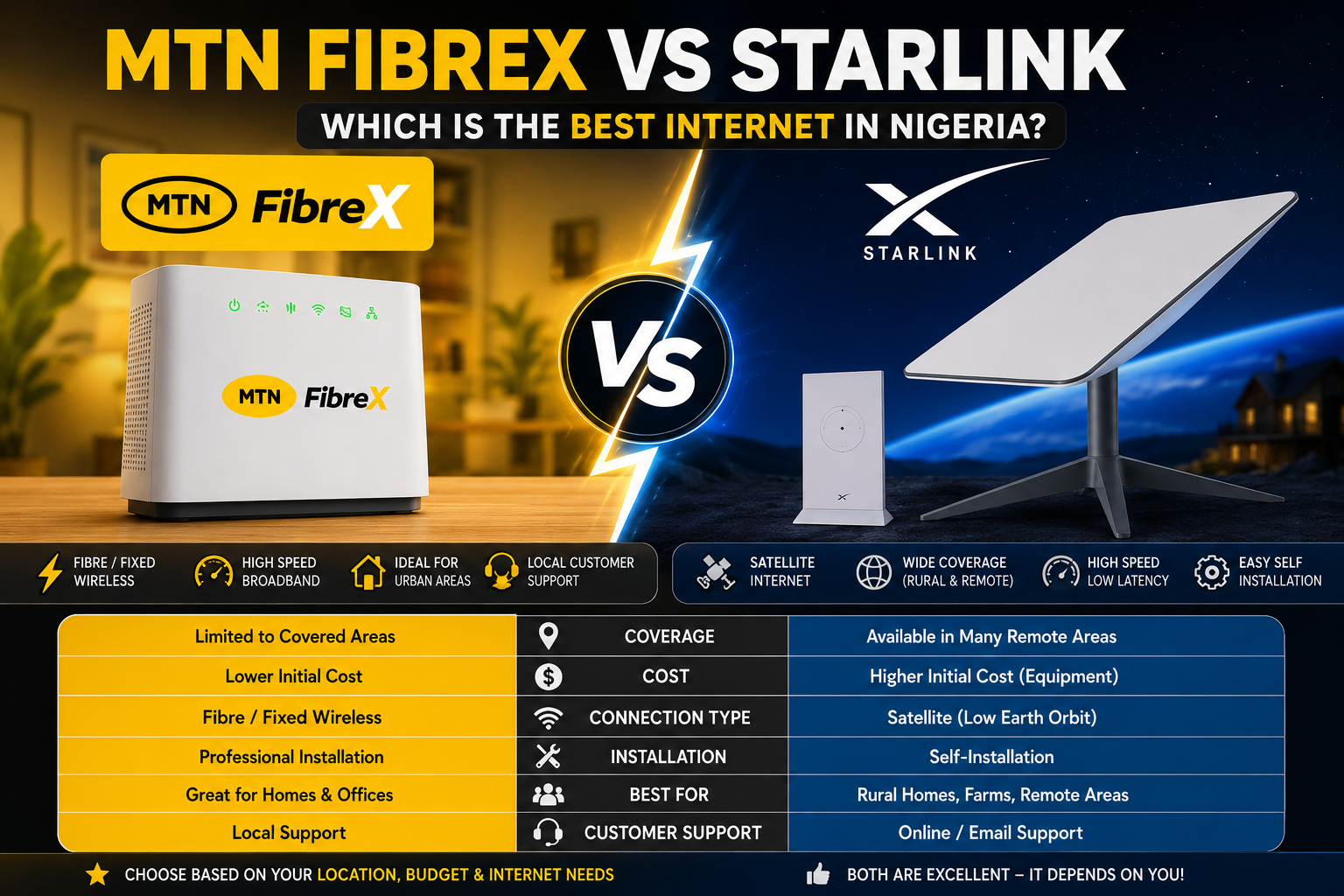
MTN FibreX vs Starlink: Which Is the Best Internet Option in Nigeria?
Choosing a reliable internet service in Nigeria can be challenging, especially with more high-speed broadband options becoming available. Two services that often come up in conversations are MTN FibreX and Starlink. Both promise fast internet, but they use different technologies and are designed for different types of users.
If you’re trying to decide which one is worth your money, this guide compares MTN FibreX and Starlink based on coverage, speed, installation, reliability, and ease of use. By the end, you’ll have a clearer idea of which service best suits your home or business.
What Is MTN FibreX?
MTN FibreX is a broadband internet service offered by MTN Nigeria. Depending on your location, it delivers high-speed internet using fibre-optic or fixed wireless technology.
It is designed for:
- Homes
- Small businesses
- Remote workers
- Students
- Gamers
- Smart homes
Because it relies on MTN’s network infrastructure, availability is limited to selected coverage areas.
Key Features
- High-speed broadband
- Suitable for multiple connected devices
- Easy subscription management
- Home Wi-Fi connectivity
- Local customer support
What Is Starlink?
Starlink is a satellite internet service developed by SpaceX. Instead of relying on mobile towers or fibre cables, it connects users through a network of low Earth orbit (LEO) satellites.
This allows users in rural and underserved locations to access broadband internet where traditional fibre or mobile networks may not be available.
Key Features
- Satellite-based internet
- Wide geographic coverage
- Works in remote areas
- High-speed broadband
- Self-installation kit available in supported markets
How Do They Work?
Although both services provide internet access, the technology behind them is very different.
MTN FibreX
MTN FibreX delivers internet through terrestrial infrastructure, such as fibre-optic cables or fixed wireless access. This generally provides stable speeds in areas where the network has been deployed.
Starlink
Starlink communicates directly with satellites using a dish installed at your location. The dish automatically aligns with satellites overhead to provide internet connectivity.
READ ALSO: How to Use MTN 5G Fibre in Nigeria: Complete Setup Guide (2026)
Availability in Nigeria
Availability is one of the biggest differences between these two services.
MTN FibreX
MTN FibreX is available only in selected cities and neighbourhoods where MTN has deployed the required infrastructure. Before subscribing, you’ll need to confirm that your address is covered.
Starlink
Starlink is available in Nigeria in supported service areas, making it a practical option for many locations, including rural communities where fibre infrastructure may not exist. Availability can still depend on regulatory approvals and network capacity in your area.
Installation Requirements
MTN FibreX
Getting started with MTN FibreX usually requires:
- Availability at your address
- A compatible router or modem
- Power supply
- Account registration
- Activation by MTN, depending on the service type
Installation requirements may vary depending on whether the connection uses fibre or fixed wireless technology.
Starlink
To install Starlink, you’ll typically need:
- A Starlink hardware kit
- A clear view of the sky for the satellite dish
- Stable power supply
- The Starlink mobile app for setup
Most users can complete the installation themselves by following the instructions provided with the equipment.
Speed Comparison
Both services offer broadband speeds suitable for everyday internet use, but actual performance depends on several factors.
| Feature | MTN FibreX | Starlink |
|---|---|---|
| Streaming | Excellent | Excellent |
| Video Calls | Excellent | Excellent |
| Online Gaming | Very Good | Very Good |
| Large Downloads | Fast | Fast |
| Multiple Devices | Supported | Supported |
Actual speeds vary depending on network conditions, location, equipment, and the service plan you choose.
Coverage Comparison
MTN FibreX
Coverage depends on MTN’s network rollout. Urban and densely populated areas are more likely to have access.
Best for:
- Cities
- Estates
- Office buildings
- Urban homes
Starlink
Because it uses satellites, Starlink can provide internet in many places where traditional broadband is unavailable.
Best for:
- Rural communities
- Farms
- Construction sites
- Remote businesses
- Locations without fibre infrastructure
Reliability Comparison
Reliability depends on different factors for each service.
MTN FibreX
Performance may be affected by:
- Local network congestion
- Infrastructure maintenance
- Power interruptions
- Router placement
Starlink
Performance may be influenced by:
- Severe weather conditions
- Obstructions such as tall buildings or dense trees
- Temporary satellite network congestion
Under normal operating conditions, both services are capable of providing a stable broadband experience.
Setup Process
MTN FibreX
The setup process generally involves:
- Confirm service availability.
- Register for the service.
- Obtain the required router or equipment.
- Complete installation or activation.
- Subscribe to an internet plan.
Starlink
The setup process usually includes:
- Order the Starlink kit.
- Install the satellite dish in an open location.
- Connect the router.
- Use the Starlink app to complete setup.
- Activate your subscription.
Who Should Choose MTN FibreX?
MTN FibreX may be the better option if you:
- Live in an area where the service is available.
- Want a straightforward home broadband solution.
- Prefer local customer support.
- Need reliable internet for work, streaming, or online learning.
- Don’t want to install a satellite dish.
Who Should Choose Starlink?
Starlink may be the better option if you:
- Live in a rural or remote area.
- Cannot access fibre broadband.
- Need internet where mobile networks are unreliable.
- Are comfortable installing a satellite dish.
- Require connectivity away from major cities.
Pricing Comparison
One of the biggest factors when choosing an internet service is cost. Both MTN FibreX and Starlink require a subscription, but their pricing structures are different.
MTN FibreX
MTN FibreX typically offers multiple broadband plans with varying speeds and data allowances. The exact pricing, installation fees, and package availability depend on your location and the current offers from MTN Nigeria.
Best for:
- Budget-conscious households
- Small businesses
- Users who already have MTN services
Starlink
Starlink requires two major costs:
- A one-time purchase of the Starlink hardware kit.
- A recurring monthly subscription.
Because hardware is required, the initial setup cost is generally higher than many traditional broadband services. However, it can be a worthwhile investment for users in areas without reliable fibre or mobile internet.
Note: Prices and plans change over time. Always check the official MTN Nigeria and Starlink websites for the latest information.
Pros and Cons
MTN FibreX
Pros
- Lower initial setup cost
- Reliable broadband in covered areas
- Suitable for homes and offices
- Easy installation
- Local customer support
- Good for streaming and remote work.
Cons
- Limited coverage
- Not available nationwide
- Performance depends on local infrastructure
- May require professional installation
Starlink
Pros
- Excellent for rural areas
- Available where fibre is unavailable
- High-speed satellite internet
- Easy self-installation
- Supports multiple connected devices
Cons
- Higher upfront equipment cost
- Requires a clear view of the sky
- Weather may occasionally affect performance
- Monthly subscription may be more expensive than some local broadband services
MTN FibreX vs Starlink Comparison Table
| Feature | MTN FibreX | Starlink |
|---|---|---|
| Internet Type | Fibre/Fixed Wireless | Satellite |
| Coverage | Selected urban areas | Wide coverage, including many rural locations |
| Installation | MTN setup | Self-installation kit |
| Equipment Required | Router/Modem | Satellite Dish + Router |
| Mobility | Fixed location | Fixed location (portable options may vary by plan) |
| Best For | Urban homes and businesses | Remote homes and businesses |
| Initial Cost | Generally lower | Generally higher |
| Customer Support | MTN Nigeria | Starlink Support |
Which Service Is Best for Different Users?
Choose MTN FibreX if you:
- Live in a city with FibreX coverage.
- Want a more affordable setup.
- Need stable internet for work, school, or entertainment.
- Prefer local customer support.
- Want a simple home broadband solution.
Choose Starlink if you:
- Live in a rural or underserved area.
- Need internet where fibre is unavailable.
- Work from remote locations.
- Require reliable broadband outside major cities.
- Don’t mind paying more for wider coverage.
Best Alternatives
If neither MTN FibreX nor Starlink meets your needs, consider these alternatives:
- Airtel 5G Home Broadband
- MTN 5G Broadband
- Spectranet
- FibreOne
- ipNX
- Smile Communications (where available)
Compare availability, customer support, pricing, and speed before making your decision.
Expert Opinion
Both MTN FibreX and Starlink are excellent internet services, but they serve different audiences.
If FibreX is available in your neighbourhood, it is often the more economical choice for everyday home and office use. Its lower setup costs and local support make it appealing to many users.
Starlink stands out for people living in remote areas where fibre infrastructure hasn’t reached. Although the initial investment is higher, it provides broadband access in places that previously had limited connectivity.
The best choice depends on your location, budget, and internet requirements rather than one service being universally better than the other.
Final Verdict: Which Is the Best?
There is no one-size-fits-all winner.
Choose MTN FibreX if:
- You live in a covered urban area.
- You want lower setup costs.
- You prefer local support.
- You need dependable home internet.
Choose Starlink if:
- You live in a rural or remote location.
- Fibre internet is unavailable.
- You need broadband almost anywhere.
- You’re willing to pay more for broader coverage.
For most users in cities where MTN FibreX is available, it offers excellent value. For users outside those areas, Starlink can be the more practical solution.
R4EAD ALSO: How to Activate Airtel 5G Unlimited Data: Complete Setup Guide (2026)
Conclusion
MTN FibreX and Starlink both deliver fast, reliable internet, but each excels in different situations. FibreX is ideal for urban users seeking cost-effective broadband with local support, while Starlink provides a powerful solution for remote areas where traditional internet options are limited.
Before subscribing, compare coverage, installation requirements, hardware costs, and available plans in your location. Taking a few minutes to research your options can help you choose the service that best fits your needs today and in the future.
Frequently Asked Questions
1. Which is faster, MTN FibreX or Starlink?
Both services offer high-speed internet, but actual speeds depend on your location, network conditions, and chosen plan.
2. Is Starlink available throughout Nigeria?
Starlink is available in many parts of Nigeria, subject to service availability and capacity. Check the official coverage map before ordering.
3. Does MTN FibreX require installation?
Yes. Installation requirements vary depending on the connection type and your location.
4. Which service is better for gaming?
Both can support online gaming, though performance depends on latency, network congestion, and signal quality.
5. Can I use Starlink in rural areas?
Yes. One of Starlink’s main advantages is providing internet access in areas with limited broadband infrastructure.
6. Is MTN FibreX cheaper than Starlink?
In many cases, MTN FibreX has a lower initial setup cost, while Starlink typically requires purchasing dedicated hardware.
7. Can businesses use these services?
Yes. Both MTN FibreX and Starlink are suitable for businesses, depending on location and internet requirements.
8. Which service is better for streaming?
Both services are capable of supporting HD and 4K streaming with an appropriate plan and stable connection.
9. Can I move my MTN FibreX connection to another address?
Relocation policies vary. Contact MTN Nigeria to confirm whether your service can be transferred.
10. Which internet service should I choose?
If FibreX is available in your area and meets your speed needs, it may offer better value. If you’re outside FibreX coverage, Starlink is an excellent alternative.

Comments are closed.